Website powered by

Japanese Subway Station (Part 4)

Making Of / 09 July 2020

Part 1
Part 2
Part 3

I lost access to my project files for a few months as I moved cities, but thankfully I got them back and was finally able to continue part 4 and complete the project! You can view the finished project here.

Set Dressing

Set dressing was easy for the most part, thanks to planning out the modular pieces within the grid. It's easy to add or remove sections if I later wanted to extend the length of the station or to add new pieces as long as they fit within that grid.

This is the top view from the final scene. Didn't really need to end up copy and pasting the lighting to the other side as it was not visible in the final screenshots.

Texturing

Honestly, texturing is nothing special. Most of the objects don't have any kind of custom wear and dirt. Most of the objects were textured with Substance Painter generators and masks, to try to finish them as quickly as possible.

While in a way it might be a bit of cheating, I was never planning to have close up screenshots, especially because the scene lacks something close to a hero asset. The closest thing would be the vending machine, which by the way, getting the drink labels was a pain in the ass. Had to create a few of them from scratch.

Materials and Lighting

Unliked the actual textures, I did spend a lot of time tweaking the materials trying to make them look right, with emphasis on the ceiling and walls as they were the ones repeated all over the scene. I also had to constantly tweak them as I moved my lighting setup around to try to have the best result possible and have them both work together properly. The only Megascan material this time around is the main floor texture.

These are all the materials are ended up using (plus the Megascan one which is in a different folder).

Decals

I added a decal texture sheet to add decals to the scene to ground it more, as well as a few Megascan dirt, leaks, and gum decals. I left a few extra spaces on the texture sheet in case I needed to add any future decals to the scene.

The scene without any dirt and sign decals looks pretty empty.

Postmortem

In my opinion, one of the most important but least talked about parts of a project is the postmortem, specifically to try and figure out what parts went well and which ones could've gone much better. This is why I will try to go a bit deep into these things and critique this project, which is easy since I'm very critical of my own work. Think of this as a "what I could've done better" if I were to start this project from zero again.

What went wrong:

  • One of the things that I did not carefully consider at the start was to properly picture how... empty a clean subway station looks without any people on it. This led to many problems later on, as I felt the entire scene ended up looking too empty on certain parts and I was struggling to find ways to populate it a bit more (one of the reasons I added the vending machines near the end). Unfortunately, it is technically a subway station, which means I was constricted by the rules a subway station had, such as that I couldn't have any random objects in the middle of the corridors without them looking out of place. Halfway through I realized I maybe should've gone with a destroyed or abandoned version, to allow me more creative freedom to work with - even if it wasn't my original intention.
  • Very closely tied to my previous point, I should've planned on which screenshots I was going to take from the very start in the blockout phase. While I did end up somewhat liking the end result of the final screenshots, the way the station was laid out made it very difficult to find interesting angles with good eye flow that worked well.
  • Working with sign decals in Japanese was harder than I thought. I wasn't able to find many of them, so I had to create them from scratch, which ended up being more time consuming than I thought. Add that to the fact that I'm OCD about them being correctly written and it was a bit of a bigger headache than I planned.
  • I spent more time than I should've to build some of the high polys, which did not end up being seen from up close. I have no idea why, as I always had initially planned not to take close up screenshots but was just not thinking about it.
  • In hindsight, I should've done the whole main corridor much longer as I did feel it ended up feeling a bit short when I was taking the screenshots.

What went right:

  • Spending that extra time planning at the beginning made it easy for me to build the whole scene with a more modular approach and quickly prop out entire sections.
  • From the beginning, I wanted to try to keep that clean, elegant, and minimalistic look that I based my station on from the original. For the most part, I feel like I've succeeded!
  • Working with movable lights, since it's a small scene, allowed me to quickly iterate on my lighting work without having to do a ton of builds.
  • While not perfect, I'm content with how the materials and lighting turned out in general. I had not done lighting in a while and it felt good to flex those creative muscles again.

Afterthoughts

I have a few different projects I want to finish beforehand, but I eventually want to come back to this one and work on a destroyed version of it. I've got a few ideas in mind to make something Fallout-ish and I feel like this project will majorly benefit from an apocalyptic treatment, and I would be able to end up with something very interesting without having to start a completely new project at zero. Adding the train is also a possibility, but I'll eventually see how I can approach this at a later time.

Thanks for taking the time to read this post, please feel free to ask any questions or add any further critiques.


Japanese Subway Station (Part 3)

Making Of / 14 October 2019

Part 1
Part 2

I finally got some more time to work again on my Subway scene so it's time for a new update! I've finished all of the low poly objects in the scene and have been able to set up basic materials to preview in UE. Below are all the low poly objects I ended up using on the scene, fully finished.

I have a combination of tile textures plus a simple trim sheet for my scene, aside from the unique objects. Walls are mostly the only objects with custom normals and tile textures so that I could have ample texture density on them but still have some custom details. I will be adding custom details much later to the walls and other parts with decals to break the tiling a little.

Here are all the unique high polys I have on the scene. Most of them are pretty simple.

I like to create my high polys with a mixture of techniques depending on what I need. Usually, it's one of the following:

- Quad Chamfer + TurboSmooth for like 90% of my hard objects. This is my favorite method to use and it's usually the quickest in my experience, the wall object on the bottom has that. Very editable and non-destructive.
- Good old support loops + TurboSmooth. I find that this method works better for smaller items like the bolts on the wall below.
- 2x TurboSmooth, but I don't usually use this since I don't have as much control over my bevels and it greatly slows a scene down after a few of them.

I always use floaters whenever possible to avoid overly complicated meshes with hard to work with geometry, and most of the time they work just fine for baking, especially with boxy objects like this one.

I prefer to bake in Marmoset as it's super easy to work with, bakes are fast and I don't have to worry about things like overlapping UVs producing weird results, which I'd have to worry in other baking software. Organization is key to quickly reimporting objects to make fixes and changes if needed, I always take great care with naming.

I set up a Substance Painter scene to work all of my tile textures in a single place and not to have a great number of scenes. Before exporting them I just update the name quickly from the folder I'm exporting from to have the correct names exported. I set up basic materials for everything but they are just alpha or placeholder materials, for the most part, to help set up a lighting pass in UE.

I started fleshing out the UE scene afterward closer to how it will look at the end. All of my lights are moveable; since it's a fairly small scene my computer can handle it and I don't have to worry too much about building the lighting all the time. Only half of the scene has lighting for now as I will just copy and paste one half to the other half once I'm done.

UE lighting only view, I'm not trying to copy the original lighting exactly but trying to work on something a bit different. I will still work on some polish but this is mostly the overall look and feel I'm going for.
Lastly, here are some WIP screenshots of how the scene is looking right now. While I still have a ton of stuff to work on, constructive feedback is always appreciated!

Japanese Subway Station (Part 2)

Making Of / 02 July 2019

Part 1

Here is today's update! I added a few more objects to the scene, and also started fleshing out some of the blockouts a bit more so that I can work the low and high polys off of them.

Here are all the objects that I currently have, which is around 30. I might end up adding a few more unique objects or lights eventually down the road but for now, I've decided this would help me produce a nice enough looking result.

For the walls, I decided to use a combination of tiling textures and geometry with custom normals, since the walls don't have a huge amount of detail I could get away with spending a few extra tris on them but not having to bake any details or use unique textures. This is a screenshot of the main wall showing the current amount of detail that it has (just a few extrudes and chamfers).

Afterward, I started importing everything to Unreal and started working on the main layout, checking to see that everything snapped properly and looked right. Pivots are very important on this stage so that you don't have any issues laying out the scene. This is the average size of the scene so far, it doesn't yet have the platform mirrored and might end up being a bit longer at the end.

I added some very basic lighting to try and nail the basic feeling for the scene with just the blockouts. I tried going for a darker scene than the one in the reference with a bit more contrast. All of the lights are movable so that I wouldn't need to build anything but still get accurate results. It will, of course, end up having much more lights on the final version and it's just a super basic WIP for now. Here are a few screenshots of how it looks so far!

I don't always do lighting passes for my scenes but in this case, I figured it would help to identify which parts would need more detailing and UV space and which wouldn't as they would be hidden by the lighting (like the pillars in the middle) they will most likely be a bit darker than the other areas.

The next update should have all of the low polys fully finished at the very least and might have a few of the high polys as well since for these types of objects they should be pretty quick to flush out.

Japanese Subway Station (Part 1)

Making Of / 20 June 2019

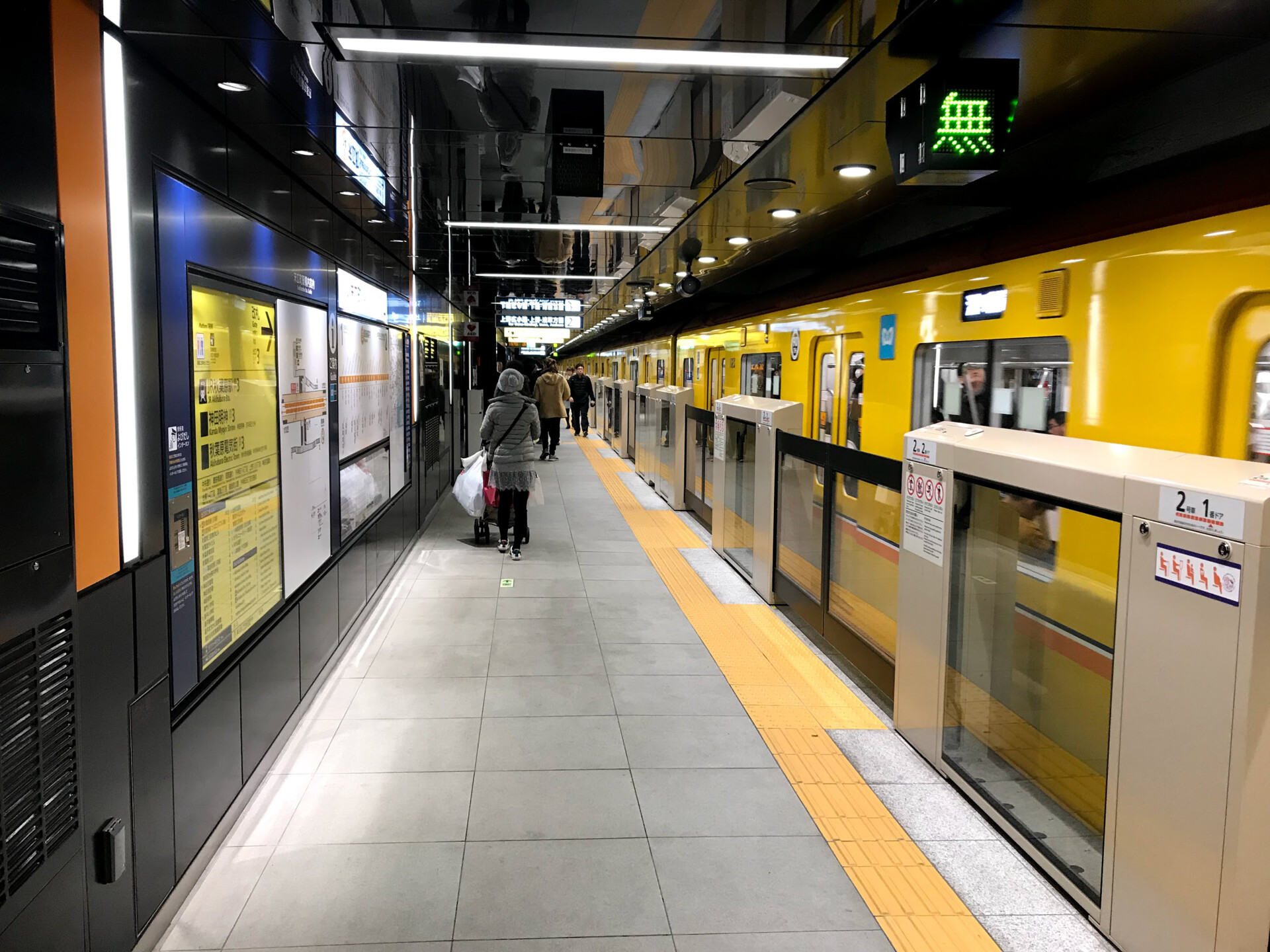
Hello! I figured for this scene I would record my progress and thought process. Looking for inspiration on a new scene to get started on, I found on a recent trip to Japan a really freaking cool subway station (Suehirocho Station in Chiyoda) that stood over all the rest. It looked extremely futuristic compared to all the other ones and was super pleasing to see. I was also looking for a scene that could be recreated with many modular pieces and this seemed just perfect! This is one of my main references:

I am mostly going to be focusing on the station itself, but I might go ahead and do the Subway cars at a later date. It won't be a 1:1 recreation as I will be trying to do my own spin on it and change around some things but I'm trying to respect the real proportions as much as I can. These are all the references I'm using for now, which I mostly got off of Google Maps as I didn't have much time to take my own pictures.

You can see the station yourself here: https://tinyurl.com/y6noumn9

With this, I set out to establish the main proportions first by getting the dimensions for the subway car and getting approximate dimensions for the floor tiles as those were the two easiest things to get official measurements from. I try to stay as consistent as possible to the real measurements but since it's going to be a modular scene I rounded out some numbers a little to make the tiling in Unreal easier and having things snap with ease. This is a general view of some of the first pieces I worked:

After locking out the general proportions and shapes I started to figure out how I was going to cut out my modular pieces. Based on the references I had, I could do modular blocks of around 8 concrete tiles wide, which I used as my main size block. Everything on the scene revolves mostly around that 8-tile size so it was very important to lock in that number early on! I did a lot of testing and it seemed to work great. For now, I created 3 different medium sized blocks (main block, chairs block, and bathroom entrance block) and two double sized blocks (information wall block and entrance block). The highlighted piece on the screenshot below is an extra detail air conditioner object that (optionally) attaches to the main wall to create a second variation of the wall without creating an entirely new piece.

I figure this would be a good number of pieces to work with as it's a nice number to mix and match without it looking repetitive and it covers most of what is seen in the references. More than that would be definitely unnecessary and would end up being unneeded extra work.

I like to color code most of my materials from the very start just to get a general sense of how many materials there will end up being and to get a general feeling of the scene. These are all the pieces I have on my scene currently (23 so far):

I did some basic scene building inside max just to test out how things would look and tile and I'm satisfied with the results so far!

For the next part, I will be blocking out the rest of the smaller objects on the scene and adding some more form to the objects I already have, before I go ahead and create the high and low polys of everything. I'm open to feedback or any questions you might have so please feel free to comment below.

Part 2